Accounting Reporting
General overview #
Accounting is the part of the system with the largest volume of data. Because the data structure in the online part of the system is not particularly suited for some types of reports, a few tables are maintained solely for reporting reasons. This is done mainly for two purposes: To make reports run faster, and to make report definitions easier.
The special accounting reporting tables are updated on a regular basis from the data tables used by SICS. The frequency of these updates may vary from one installation to the other, e.g. daily or hourly.
Objects that belong to accounting are grouped in the classes shown below.
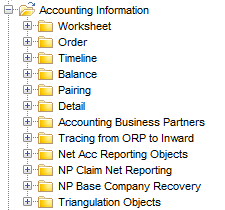 An accounting report with details down to entry code and amount, in the following called Detail report, will typically use objects from the Detail class, the Balance Class, the Timeline class, and Accounting Business Partners. This may be combined with objects in other classes e.g. Business Information.
A report with balances and settlement information, in the following called Balance report, will typically use objects from Balance, Timeline, and Accounting Business Partners possibly combined with Business information. Settlement pairing information is available in the Pairing class.
The classes above consist of subclasses. Some with particular interest are mentioned here.
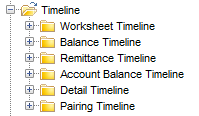
In Detail reports objects from Worksheet Timeline, Balance Timeline, Account Balance Timeline, and Detail Timeline may be used.
In Balance reports objects from Balance Timeline, Remittance Timeline, Account Balance Timeline and Pairing Timeline may be used.
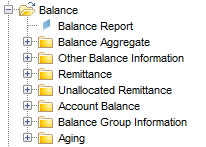
In Detail reports objects from Account Balance and Other Balance Information may be used. The object Balance Report must not be used.
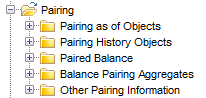
The Pairing objects should only be used in Balance reports.
The Pairin g class combined with Balance information is a complete rework of the former pairing structure.
It offers the possibility to create two types of reports:
Detail Reports #
This kind of report must not contain the object Balance Report or any object that is remittance specific, i.e. objects from classes Remittance Timeline and Remittance must be avoided. The same goes for objects in Pairing and Pairing Timeline.
Note that only details belonging to closed worksheets are available in reports. This is because only information from closed worksheets are transferred to the reporting table for accounting details.
Precalculated Reserve Positions. #
To report the reserve position for a particular accounting year, there is an Entry Code available that holds helpful information. Prefix existing reserve code by an ‘A’ and report the amount for this new entry code. Example: Let us say that code ‘80’ is the code for a reserve movement. Code ‘A80’ for accounting year 2014 will then hold a sum of code ‘80’ for all accounting years up to and including 2013.
Similarly there is also a prefix ‘B’ used for Reserve position based on booking years. Example: As above. Code ‘B80’ for booking year 2014 will then hold a sum of code ‘80’ for all booking years up to and including 2013.
These codes (original codes prefixed by ‘A’ or’B') are generated automatically, and are also automatically included in any entry code group that has the original code as a member.
Note! If the report has been designed with a condition on the accounting year, the all ‘B’ reserves are omitted from the report because they do not have an accounting year. If the report has been designed with a condition on the booking year, the all ‘A’ reserves are omitted from the report because they do not have a booking year.
Balance Reports #
This kind of report must contain the object Balance Report.
A balance report must not contain any Detail information. This means that objects in class Detail and Detail Timeline must not be used.
Balance Reports without Settlement Pairing information. #
Objects in class Pairing and class Pairing Timeline must be avoided.
Balances of all statuses are reportable. If you want to restrict your report to specific statuses, this must be specified in the Conditions part of the report definition.
Balance Reports with Settlement Pairing information. #
This kind of report will be restricted to Actuals, Is Estimate= ‘No’, available in Business Partner ledger in SICS. Technically this is implemented with the restriction that In Account Phase = ‘Yes’.
This means that there is no need specifically to exclude balances for OCCs or estimate balances. Similarly there is no need to include or exclude balances As Original Phase, As Booking Phase, or As Account Phase.
Balance reports with settlement pairing information must contain either the object Pairing as of Date or the object Pairing History Dates.
Pairing as of Date will prompt for a date, and the reported pairing information requested will be as of this date. Of particular interest in this type of report is the ‘Unsettled Amount’ which is reported as of the desired date. This amount may even be split into unsettled premium amount and unsettled claim amount based on entry code definitions.
Pairing History Dates will prompt for two dates, a from-date and a to-date. The reportable information will be:
- The situation before the period started and at the end of the period: Unsettled Amount At Start of Period and Unsettled Amount At End of Period.
- A ll settlement pairings that took place in the period: Other Pairing Information and the objects in Balance Pairing Aggregates. In addition it is possible to report any information stored for the balance, including some Business information.
- Objects in the Paired Balance class which holds information about the balance that the “main” balance in the report in paired with. Only limited information is available for Paired Balance r, but sufficient to identify it
Objects from the class Pairing as of Objects should not be combined with objects in the class Pairing History Objects.
Report Conditions to Consider #
In order to get the correct information when creating reports with accounting information there are a few objects that usually have to be included as condition objects. The information you see by default when opening a Business Ledger in SICS on any business have a number of conditions. In order to replicate these you must have the following objects included in the report, and they all originate from the Accounting Information class.
-
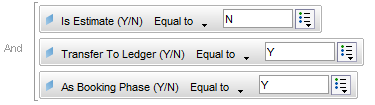
The objects_Is Estimate (Y/N) = No_ and_Transfer to Ledger (Y/N) = Yes_ force the report to avoid any booked estimates and only bring back values that have been transferred to ledger from claim worksheets.
-
The object As Booking Phase (Y/N) forces the report query only to bring back those items that are relevant for this balance phase. Applies to OCC and ORP level of businesses.
|
Transfer to Ledger (Y/N) #
On the Claim Worksheet in SICS you have a check box called Transfer to Ledger. In the universe, you find the same object under the Accounting Information class, called Transfer to Ledger (Y/N).
If you want to see all balances transferred to the business ledger, set this object to Yes in the report conditions. Alternatively, you set the object to No when you want to see booked claim amounts, which have not been transferred to the business ledger.
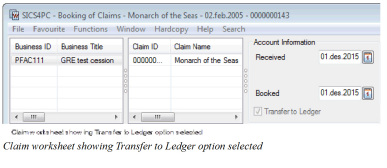
Note! This option only applies to Claim Worksheets. There is no equivalent for Technical Worksheets.
Balance is As Original Phase (Y/N), As Booking Phase (Y/N), and As Original Phase (Y/N) #
This is relevant for Detail reports and Balance Reports without Pairing, but not for Balance Reports with Pairing,
When booking on assumed business the amounts are automatically saved As Booking Phase and As Account Phase. The same amount is also automatically transferred to the original cedent’s contract (OCC) level, but As Original Phase. When the amount continues in the retrocession chain to the OCC, it is transferred As_Booking Phase_. When the amount continues in the retrocession chain to the Retrocession Participation (ORP), it is again transferred As _Booking Phase_. After one last transformation on the ORP level the amount ends up with the status _As Accounting Phase_.
For Prop Fac ORP the Phases depends on a System parameter. The possible values are shown in the table below.
| Business | As Original | As Booked | As Acccount | Comments |
|---|---|---|---|---|
| Assumed Business | No | Yes | Yes | |
| OCC | Yes | No | No | |
| Prop Treaty ORP | No | Yes | No | |
| Prop Treaty ORP | No | No | Yes | |
| Prop Fac ORP | No | Yes | Yes | ToF Order in Use = No |
| Prop Fac ORP | No | Yes | No | ToF Order in Use = Yes Before order |
| Prop Fac ORP | No | No | Yes | ToF Order in Use = Yes After order |
| Non-Prop ORP | No | Yes | Yes |
Accounting Business Partners #
Creating reports showing accounting information together with partner information, it is always best to select all, or as many as possible, objects from the Accounting Information structure.
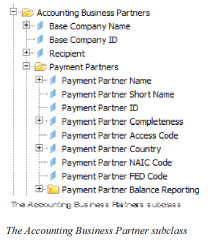
Combining the above information with Scope of Cover (SOC) information, demands that the SOC must be taken from the Accounting Classification class rather than from the Business Information class. The reason for this is that there is a single relationship between an accounting classification and an accounting detail item.
Including partner details from the Business Information structure in an accounting report can cause problems. Therefore it is recommended that you use objects from the Payment Partners class. If you do not, you get a report result with all possible combinations for the partner since many partners are related to one business, but there is only one payment partner.
The only Partner related objects you can use from the Business Information structure are Cedent Name, Broker Name, Reinsurer Name and Insured Name. These can be used as they are stored on the Reporting table.
Amount Entry Code Group Objects #
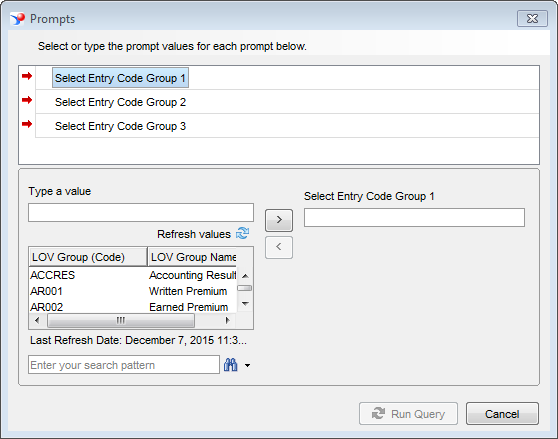
Amount Entry Code Group objects have been defined in the universe to allow reporting on several entry code group amounts at the same time without having to create multiple queries or having to retrieve additional objects in order to see the amounts per group. These objects are of use in accounting reports like triangulation.
When running a report with an Amount Entry Code Group object, a prompt asks you to select the code for an Entry Code Group. You enter the code corresponding to the group you wish to retrieve the amount for.
Retrocession Accounting Reporting #
Ordinary Retrocession Accounting Information #
When you create a report to show retroceded accounted figures without any related assumed business or accounting information, you condition the report to Level of Business equal to ORP (Retrocession Participation).
When you extract accounting data from the ORP level, bear in mind that you have the two balance ledger phases; As Booking and As Account. Therefore you need to consider whether you want to condition the report with objects.For more information, refer to_Balance is As Original Phase (Y/N), As Booking Phase (Y/N), and As Original Phase (Y/N) on page 20-23_.
For the report result objects you select objects from the Accounting Information class.
Tracing Accounting Information from ORP to IAB #
Within the Accounting Information structure there is a subclass called Tracing from ORP to IAB.
Using objects from this subclass and in order to retrieve any data, the check box Trace Source Business from Outward Bookings in System Parameters/Accounting/Miscellaneous has to be selected.
The “tracing” objects only show data as of that date when the function in the System Parameter was turned on, no historical data is populated. These objects cannot be used in conjunction with the objects from the Net Acc Reporting subclass. If that is done the accounting figures is aggregated.
The level of business in this kind of report should be conditioned to show ORP (Retrocession Participation).
Net Accounting Reporting Objects #
Using objects from subclass Net Acc Reporting Objects does not require any special System Parameter settings.
In order for the “Net accounting objects” to retrieve any data you first need to make sure that:
- All retrocession calculation orders for a specific period are run
- The periodic function Update Retro Pairing Table is run
This type of report should be conditioned on level of business to show IAB (Assumed Business).
Non-Proportional Claim Net Reporting #
The objects in the NP Claim Net Reporting class are used to trace the origin of the non-proportional recovery bookings. The class is divided into two sub classes:
Inward Claim Information containing objects which display the source assumed claim details for outward claim bookings.
Outward Claim Information containing objects which display how assumed claim bookings are distributed to outward claim recoveries.
In order for these objects to retrieve any data, non-proportional recoveries must be booked through the automatic recovery calculation facility.
Running Sum and Triangulation #
To be able to do running sum calculations in a report there has to be a table with a value or a null value. It is however easy to get confused when creating a running sum in a cross tabulation report. It may appear that there is a cell with a null value when there in fact is nothing there.
In the below example there appears to be a null value in the first row of the report.
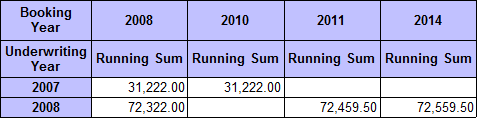
Example showing a ‘null’ value in row 1 for Booking Year 2011
By looking at the ‘raw’ data, we can see that there is no data for underwriting year 2007 and booking year 2011, which means that the database does not contain any such data. No data can be retrieved from the database.
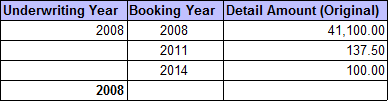
The only reason why the empty cell appears is to simplify the design when you create a cross tab report. When creating a cross tab Business Objects forms a square of cells but not all cells exist in the database. This is why there is a problem when trying to do a running sum. The aggregated total is not brought forward to those cells that have a null value.
The Triangulation Objects #
Triangulation reports including months or quarters without bookings return empty cells to the report. The report shows missing rows or columns for these months or quarters because no data could be retrieved.
A work-around is to use objects from the Triangulation Objects class within the Accounting Information structure.
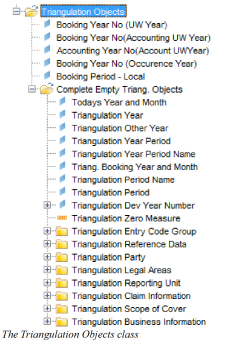
To create a report using the triangulation objects you need to create two queries in the report.
The first query retrieves bookings using object Amount Entry Code Group together with some timeline objects. The second one must be built using objects entirely from subclass Complete Empty Triang Objects in order to avoid a report result with all possible combinations. The second query retrieves “0” for each combination of time and reference data.
A merge of the two queries overcomes the problem of missing rows or columns where for example no bookings were made in a particular month.