Maintain Multiple Stamp Agreements
In multiple stamp arrangements, one owned or managed entity in a corporation typically underwrites on behalf of another entity. When an underwriter places a share, the share is underwritten on behalf of other entities with each taking a pre agreed portion. The pre agreed apportionment can be between two or several entities.
SICS handles these arrangements by use of a joint contract representing the total share to be split between the entities (insurers/reinsurers). All terms and condition are managed through the joint contract. When bound SICS creates participating contracts to support further processing.
Create new pending Joint Contract #
Set up a new agreement that holds total share for all insurers/ reinsurers.
- Open the Find Business window and select the Create New button or select New from the pop-up menu
- In the new Business Wizard, select Joint Contract as Level of Business
- Select Type of Business, a pending Life Cycle Status (e.g. New Agreement Offered) and other details (Insured Period, Title, Main Currency etc.) as you would when creating any new assumed business. Click Next.
- On the Assign Business Partners page of the wizard, select Stamps. Only Stamps with Valid Period covering your business' Insured Period From Date are available.
- Assign wanted Stamp. Insurers/ reinsurers are assigned according to stamp details
- Assign other business partners relevant for your business. Press Next.
- Classify the Business as you would any other business. Press Next.
- Enter Offered Share
- Select Finish to complete the New Business Wizard
On the new Joint Contract, Partners tab, you can view the assigned insurers/ reinsurers and their part of the agreement (UA %), as defined in the stamp.
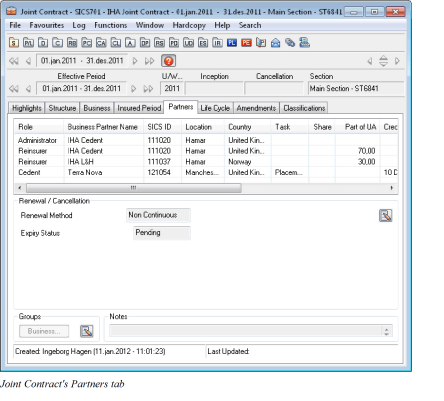
Create participating contracts #
Change the Life Cycle Status of a Joint Contract from a non-definite to a definite status.
- Open Joint Contract and navigate to the Life Cycle tab
- Select New Life Cycle Status from the menu button
- Select a definite Life Cycle Status, e.g. “Offer Accepted”
- Enter Written/ Signed Share
- Select Finish
If creating a new Joint Contract with a definite Life Cycle Status, the assumed placements are created simultaneously.
On the Joint Contract’s Placements list, the assumed placements can be viewed. System has created one assumed placement for each insurer/ reinsurer.
-
All terms and conditions on assumed placements are the same as on the Joint Contract, but according to its own share.
Exception: the Joint Contract cannot be reinsured, i.e. protection is maintained on each separate placement in the same way as for other Assumed Businesses -
No information is changeable, only viewable on the assumed placements
-
Assumed placements have the same Life Cycle status as the Joint Contract
-
Shares are calculated on assumed placement as per details on Joint Contract’s Partners tab and Share Condition
EXAMPLE:
Joint Contract:Share from 100%:50%
Reinsurer A:Part of UA%70%
Reinsurer B:Part of UA %:30%
System calculates Share From 100% on assumed placements according to formula:
Joint Contract’s Share from 100% x Reinsurer’s Part of UA %
100
Reinsurer A’s Share from 100%:50 x 70= 35%
100
Reinsurer B’s Share from 100%:50 x 30 = 15%
100

Note: Accounting and all claims handling are performed from the assumed placements
Renew Joint Contract and assumed placements #
Renew Joint Contracts and linked assumed placements to new Insured Period
- Open Joint Contract and navigate to the Life Cycle Tab
- Select Renewal from the menu button
- Select a definite Life Cycle Status, e.g. Offer Accepted, and enter new Insured Period
- Press Next, and enter Shares
- Press Finish
Both Joint Contract and belonging placements are renewed to new insured period. Renewing Joint Contract to a pending Life Cycle Status and then change Life Cycle Status to definite, same behaviour applies (i.e. placements are renewed once Joint Contract has a definite Life Cycle Status on new insured period).
Insurers/reinsurers assigned to the business may have changed since stamp was assigned to the Joint Contract. Upon renewing a Joint Contract, system assigns placement on new insured period according to the following rules:
- Insurer/ reinsurer exists on both valid periods in stamp, assumed placement is renewed
- Insurer/ reinsurer does not exist on stamp’s new valid period (business partner is removed from stamp), assumed placement is not renewed
- Insurer/ reinsurer does not exist on stamp’s previous valid period (added on stamp), new assumed placement is created on the new insured period